Tracked changes: formatted table
Təhdid postu: Andrus Lauringson
Andrus Lauringson
Andrus Lauringson  Identity Verified
Estoniya
Local time: 19:44
Member (2022)
English to Estonian
+ ...
Dec 20, 2025

Hello!

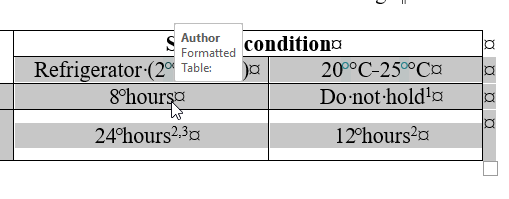
I am updating a Word file, based on client's tracked changes, and when I hover the mouse cursor over a table, it simply says: "Formatted Table:" but no other information.
How to find out what (if anything) was changed? I don't see any differences.

formatted_table

[Edited at 2025-12-20 01:55 GMT]


Samuel Murray
Samuel Murray  Identity Verified
Niderland
Local time: 18:44
Member (2006)
English to Afrikaans
+ ...
It might mean Dec 20, 2025

Andrus Lauringson wrote:
I am updating a Word file, based on client's tracked changes, and when I hover the mouse cursor over a table, it simply says: "Formatted Table:" but no other information.

It might mean that the table's formatting was changed while tracked changes was enabled. So, no text was changed, but the formatting was changed. E.g. it used to be right-aligned and now it's left-aligned.


Andrus Lauringson
 
Stepan Konev
Stepan Konev  Identity Verified
Rusiya Federasiyası
Local time: 19:44
English to Russian
Balloons Dec 21, 2025

They seem to have added a nonbreaking space everywhere before °С. It would be correct if the target language was Russian for example. In English, as far as I know, there should be no white space or nbsp between the number and the °С.

What regards the editing/formatting tooltips, they show up because of your settings. If you want to change it, navigate to the Review tab, Tracking group of icons, Show markup, Balloons. Your current setting most probably is 'Show all revisions inl
... See more
They seem to have added a nonbreaking space everywhere before °С. It would be correct if the target language was Russian for example. In English, as far as I know, there should be no white space or nbsp between the number and the °С.

What regards the editing/formatting tooltips, they show up because of your settings. If you want to change it, navigate to the Review tab, Tracking group of icons, Show markup, Balloons. Your current setting most probably is 'Show all revisions inline'. It applies to all other edits either: e.g., if you hover over the green nonbreaking space character, you would see the edit tooltip.
You can change it to 'Show revisions in balloons' if you want to see the edits in the right-hand pane.

[Edited at 2025-12-21 12:18 GMT]
▲ Collapse


Andrus Lauringson


To report site rules violations or get help, contact a site moderator:


You can also contact site staff by submitting a support request »

Tracked changes: formatted table


LinguaCore
AI Translation at Your Fingertips

The underlying LLM technology of LinguaCore offers AI translations of unprecedented quality. Quick and simple. Add a human linguistic review at the end for expert-level quality at a fraction of the cost and time.

More info »
Anycount & Translation Office 3000
Translation Office 3000

Translation Office 3000 is an advanced accounting tool for freelance translators and small agencies. TO3000 easily and seamlessly integrates with the business life of professional freelance translators.

More info »